
The "Sales Stage to be Automatically Set on Deal Close" feature enables the automatic updating of the Sales Stage when a Deal is marked as "Closed-Won" or "Closed-Lost." This automation helps ensure consistency in Deal Management and reduces manual updates by the sales team. The feature can be configured by administrators to align with your specific sales processes. To set this feature on the Admin site, please follow the steps below:
1. On the Admin site, navigate to Admin and select Settings.

2. On the Settings page, scroll down to the Deal Options, set the options below to YES or NO and select the default Sales Stage from the dropdown. Then click the Save button.
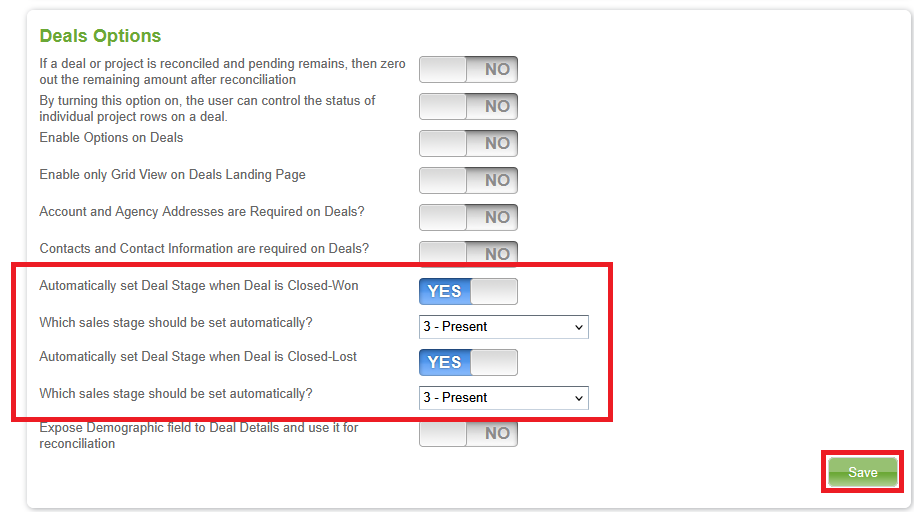
Note: After the feature has been configured by the admin, the end users may notice the following changes :
- When a Deal status is manually updated to "Closed-Won" or "Closed-Lost" from the Deal profile or Quick Deal feature, the Sales Stage is automatically updated based on the Admin Setting.

- Deals closed through the CoxReps importing, Proposal importing, or reconciling processes will also trigger an automatic update of the Sales Stage according to the configured settings.